Video to URL: Complete Step-by-Step Guide for Fast Sharing in 2026
Learn how to convert video to URL in minutes. This 2026 guide covers upload workflows, URL types, SEO basics, and sharing tactics for creators, marketers, and businesses.
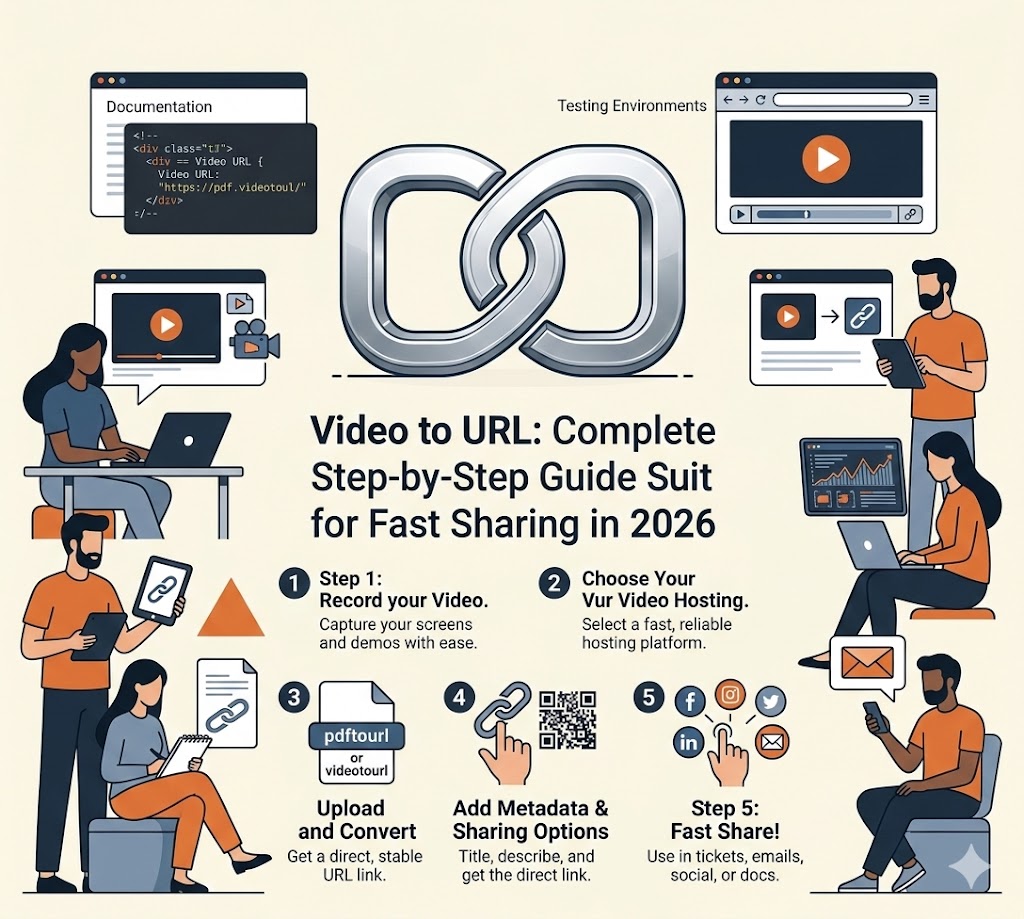
If you are still sending video files as attachments, you are slowing down distribution, collaboration, and campaign speed. A clean video to URL workflow turns any video file into a link you can share instantly across websites, social media, email, and chat.
This guide explains exactly how to go from raw file to optimized URL, with practical SEO steps you can apply right away.
What Is "Video to URL"?
Video to URL is the process of:
- Uploading a video file
- Letting the platform process and host it
- Receiving a public or private URL
- Sharing or embedding that link anywhere
Instead of pushing heavy files around, you maintain one canonical link and update the source content centrally.
Why a Video URL Workflow Matters
Operational Benefits
- Faster sharing with clients and teams
- Lower friction for viewers on mobile and desktop
- Easier version control when edits are needed
- Better analytics than file attachments
Growth Benefits
- More places to distribute the same video
- Better indexing opportunities for search engines
- Cleaner campaign tracking with UTM parameters
- Higher reuse across landing pages and content hubs
Step-by-Step: Convert Video to URL
Step 1: Prepare the Video File
Before upload, make sure your file is ready:
- Format: MP4 (H.264) is usually safest
- Resolution: 1080p for most marketing use cases
- Length: Trim intros and dead space
- Audio: Normalize volume for clear playback
- Naming: Use descriptive filenames (for example,
video-to-url-product-demo.mp4)
Step 2: Upload and Process
Upload your file to your hosting platform. During processing, most tools will:
- Create streaming-friendly versions
- Generate thumbnails
- Optimize playback for different devices
- Produce one or more share URLs
Step 3: Choose the Right URL Type
Different campaigns need different link types:
| URL Type | Best Use Case | SEO Impact | |----------|---------------|------------| | Public page URL | Blog posts, landing pages | Strong when page text is optimized | | Embed URL | Product pages, docs, tutorials | Helps engagement and time-on-page | | Direct file URL | Internal workflows, downloads | Limited SEO on its own | | Private token URL | Client reviews, gated assets | Controlled access, limited indexing |
Step 4: Add Metadata and Context
A video URL alone is not enough. Add:
- A keyword-focused page title
- A concise description with primary and secondary search terms
- A text summary or transcript
- A visible call-to-action near the video
Search engines evaluate surrounding context, not only the media file.
Step 5: Distribute and Track
Publish your video URL across:
- Blog content
- Email newsletters
- Social posts
- Product onboarding flows
- Sales follow-up sequences
Add UTM tags so you can measure which channel drives the most qualified views and conversions.
SEO Checklist for Video URLs
Use this quick checklist before publishing:
[] URL slug includes target keyword (video-to-url)
[] Page title includes clear search intent
[] Meta description explains the benefit in one sentence
[] Video has supporting text or transcript
[] FAQ section answers user intent questions
[] Structured data is added when possible
[] Internal links point to related pages
Common Mistakes to Avoid
1. Uploading Without a Landing Context
A bare link with no meaningful page content usually performs poorly in organic search.
2. Using Generic File Names
final_v2_reupload.mp4 does nothing for organization or discoverability. Use descriptive naming conventions.
3. Ignoring Mobile Playback
If your video page loads slowly on mobile, users bounce fast and rankings can suffer.
4. No Tracking Parameters
Without UTM and event tracking, you cannot identify which placements generate results.
Recommended Workflow for Teams
For repeatable execution, standardize this process:
- Record or edit the source video
- Upload to your video-to-URL platform
- Generate public and embed links
- Publish on an optimized landing page
- Distribute with channel-specific UTM tags
- Review analytics weekly and iterate
This single workflow can support content marketing, product marketing, support documentation, and paid campaigns.
Final Takeaway
The best video to URL strategy is not just technical upload. It combines hosting, page optimization, and measurable distribution. If you build this as a repeatable system, every video becomes a scalable SEO and growth asset instead of a one-off file.
About PdfToUrl Team
Related Articles
How to Convert PDF to URL: Complete Step-by-Step Guide for 2026

Video to URL for Marketing: 9 Campaign Workflows That Convert in 2026
